
A week of posts, in your customers' languages.
Delta25 Content Studio uses AI to create, illustrate and schedule a full week of social media posts in minutes, in nine languages, across all major social media platformsX (Twitter) · Instagram · TikTok · LinkedIn · Facebook · YouTube · Threads · Reddit · Pinterest · Bluesky · Snapchat · Google Business.
Built for small businesses and the agencies that serve them. It reads how each post performed and suggests what to write next.
For Windows. Nothing posts without your approval.
Nine languages. Tested on real posts.
Each post is written in the language itself – not translated word for word.


Results shape your next posts.

See which posts people read, like and share.
The numbers come straight from the accounts you connect, week by week and post by post.
Learn when your audience is listening.
Each square is a day and a time of day. The darker it is, the better your posts did then. Empty squares mean nothing has been posted then yet.


Get advice on what to write next – only from patterns your results can actually support.
Every piece of advice says how many posts stand behind it, and carries one of three labels. Only Reliable advice can change what it writes, and only after you switch it on.
Schedule an entire week's posts.
One brief, one post and its picture. Edit any line before it goes anywhere.

Seven days planned across your pages. Each day shows whether it is a draft, ready or scheduled.

Write and review it once, then schedule it on the days you choose. You can still edit any single day.

Before anything is saved, it writes sample posts from what it read and asks whether you would put your name on them.
Every post on your customer's clock.
Set each business’s time zone once. Posts go out at their local time, and the app shows you the time in theirs.

Five steps, and you approve every one.
It asks for what you can answer and works out the rest, then shows you what it worked out before it acts on it.
It learns your business from your website.
Give it your business name and web address. It reads the pages and writes back one paragraph about what you do. You correct it in your own words before anything is saved.
Say what you want in plain words.
One sentence, the way you would say it out loud. It works out the keywords, the tone and the instructions for the AI.
It shows what it understood before writing.
Type of post, tone, audience, goal and keywords, each with a Change link. Nothing is written until you agree.
The post, the picture and the guidance.
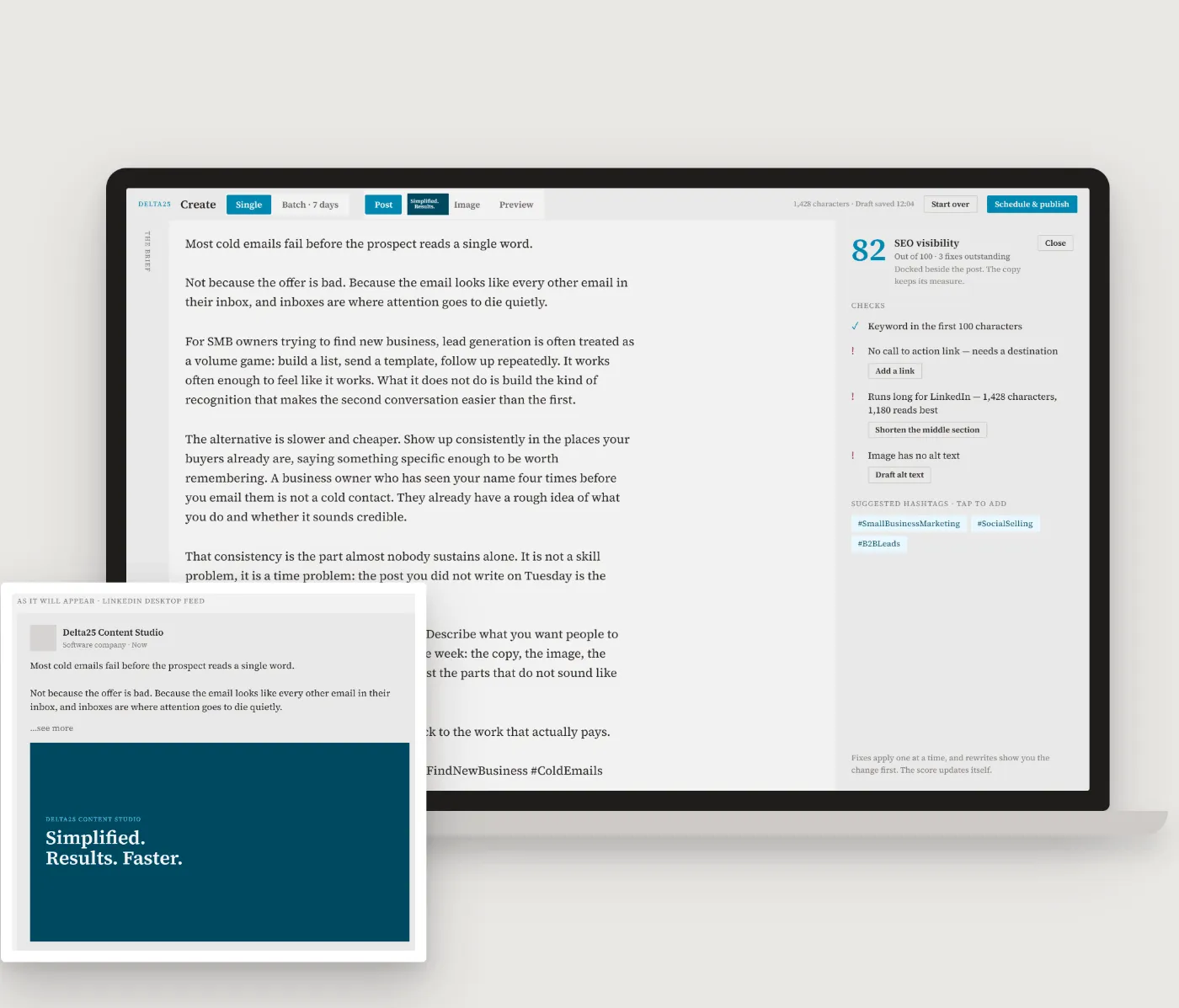
A finished post and an image sized for the platform, with a score and the specific fixes that would raise it. Fixes apply one at a time, and you see each change first.
You approve, and it posts on time.
Pick a day and a time. It goes out whether or not your computer is on, and until then you can change the wording, move the time or cancel it.

Writes in your voice
It writes from what it learned about your business and the corrections you gave it. You see each post exactly as it will look in the feed.
Plans and posts on schedule
Schedule one post or a week of them. Scheduled posts go out from the server, so your computer can be off.
Learns from your results
It reads the numbers from your pages and shows when your audience responds. Advice changes what it writes only after you switch it on.
Your pages, your keys, your approval.
Nothing posts without your approval.
Every post waits for you to schedule or publish it.
It uses your own AI key.
The writing is billed to you directly. Delta25 does not resell it.
Posts go straight to your own accounts.
X, Instagram, TikTok, LinkedIn, Facebook, YouTube and six more, each connected once.
Your keys are stored encrypted on your computer.
They are sent only to the service each one belongs to.
Two plans.
Beta seats are open now. Paid plans start in December 2026.
Beta testers use Content Studio before the paid plans begin. Both plans use your own AI, publishing and search accounts, so those costs are billed to you directly at each provider’s rates.
Studio
One business
One workspace: one business, its website, its voice and its pages.
Studio 5
For agencies and freelancers
Five workspaces, each with its own business, voice, pages and results.
Frequently asked questions
Yes. Delta25 Content Studio is a Windows desktop app. Scheduled posts go out from the server, so they do not depend on the computer being on.
We have only tested the Delta25 Content Studio on Windows 11.
All 12 major platforms: X (Twitter), Instagram, TikTok, LinkedIn, Facebook, YouTube, Threads, Reddit, Pinterest, Bluesky, Snapchat, and Google Business. You connect each account once.
Your posts are scheduled in the cloud and published on your schedule. Your computer doesn’t need to be on for your posts to be published.
English, Spanish, French, Arabic, Chinese, Portuguese, Dutch, Italian and Japanese. Each post is written in the language itself, not translated word for word.
Setup walks you through connecting each one, with a link to the page where you create it:
- An AI key (OpenAI) – writes your posts. Entered once and shared by every workspace.
- A publishing account (Zernio) – sends your posts to your social media pages.
- A web search key (Brave)
- Your WordPress site – optional, to publish to your website.
The plan price, plus your own AI, publishing and search accounts, which each provider bills to you directly. In AI usage, writing a post costs a fraction of a cent and reading a website costs a few cents.
Yes. Your keys are stored encrypted on your computer and are sent only to the service each one belongs to. Your brief is sent only to write your post, and finished posts are sent only to publish them to your accounts.
Yes. You can change every word and the picture, and nothing goes out until you schedule or publish it. After a post has gone out you can still edit its text, but not its image.
In December 2026. Studio is $29.95 a month for one business, and Studio 5 is $89.95 a month for up to five. Beta seats are open now.
Start with one sentence.
Give it your business name and website. You will see three sample posts before anything is saved.
